

Travel data calculator
How much data do you need?
Answer two questions and get a plan size you can trust. It takes under a minute.
How long is your trip?
How do you use your phone abroad?
Your estimate
Make it match your habits
Drag the sliders and watch your data budget fill up.

Key takeaways
How much data you need depends on what you do, not only on how long you stay. On a trip, a light user needs about 100 to 300 MB a day, an average user 300 to 700 MB and a heavy user 1 to 3 GB. Video decides which group you are in: an hour of Netflix in HD uses about 3 GB, an hour of WhatsApp text chat 2 to 3 MB. Enter your habits in the calculator above for a number for your trip.
Affiliate disclosure
Vefru.com is supported through affiliate links and advertisements. When you click on affiliate links and make a purchase, we may earn a commission. These partnerships help us provide you with valuable content. Our commitment to unbiased information remains unchanged.
How much data do I need? Our data usage calculator above answers that for your phone or tablet in a few clicks. Below it, this guide shows what uses data, how much each app takes and how to track and cut your use. That way you can check the calculator's estimate against your own habits before you pick a plan.
Article Contents
How much data do I need? What 1, 5 and 10 GB cover
Mobile data is counted in megabytes (MB) and gigabytes (GB), and 1 GB is 1,024 MB. The table shows what each amount covers if you spend all of it on one thing. We worked every row out from the same rates used on this page, so the three columns match each other.
| 1 GB | 5 GB | 10 GB | |
|---|---|---|---|
| Web pages | about 300 | about 1,500 | about 3,000 |
| Emails without attachments | about 1,000 | about 5,000 | about 10,000 |
| Music at normal quality | about 25 hours | about 125 hours | about 250 hours |
| HD video | about 20 minutes | about 1 hour 40 minutes | about 3 hours 20 minutes |
Surveys put the average smartphone user at 3 to 5 GB a month, but habits vary a lot. The calculator works from your own activities, not from an average. For a closer look at single plan sizes, see what 2 GB is enough for, what 5 GB covers and how long 10 GB lasts.
Data usage by activity: what uses your mobile data?
Text and maps barely use data; video uses a lot. The table sorts common activities from light to heavy, so you can see which of yours count.
| Activity | Data used | Level |
|---|---|---|
| Email (no attachments) | 20 to 300 KB per email | Low |
| Text chat (WhatsApp, Messenger) | 1 to 2 MB per hour | Low |
| Web browsing | 1 to 3 MB per basic page | Low |
| GPS directions | 5 to 10 MB per hour | Low |
| Social media (Facebook, Instagram) | 80 to 150 MB per hour | Medium |
| Music streaming | 40 to 150 MB per hour, by quality | Medium |
| Voice calls over apps (VoIP) | 30 to 40 MB per hour | Medium |
| App downloads | 4 to 100 MB per app | Medium |
| Video streaming | 300 MB to 7 GB per hour, by resolution | High |
| Video calls | 250 to 600 MB per hour | High |
| Online gaming | 40 to 300 MB per hour | High |
| File downloads | depends on the file size | High |
Once you know your main activities, the calculator's estimate gets much closer to your real use. This matters most on a trip, when a travel eSIM is often your only connection. If eSIMs are new to you, start with how an eSIM works.
User profiles: which data user are you?
Most people fit one of four profiles. The monthly figures are typical use at home. On a trip you usually use more per day, because you rely on maps and translation apps and have less Wi-Fi.
| Profile | Typical habits | Data per month |
|---|---|---|
| Light user | Email, messaging apps, some browsing and maps | 1 to 2 GB |
| Average user | Social media, music on the commute, short videos, maps several times a week | 3 to 6 GB |
| Heavy user | Video every day, video calls, video-heavy social media, sharing photos and videos | 10 to 20 GB |
| Power user | HD or 4K video, large downloads, online games, phone used as a hotspot | 20 GB or more |
For a quick travel estimate, divide your monthly use by 30 and multiply by the number of days you will be away. The calculator does this sum for you and adds the travel factors described below.
Data usage by popular apps
Video apps use the most data. YouTube, Netflix and TikTok decide your total far more than chat, maps or music, so check their quality settings first.
| App | Data use |
|---|---|
 | Google Maps directions: 5 to 10 MB/hour (standard), 20 to 50 MB/hour (satellite view) |
 | YouTube: 270 MB/hour (480p), 720 MB/hour (720p), 1.5 GB/hour (1080p) |
 | Netflix: 1 GB/hour (standard), 3 GB/hour (HD), 7 GB/hour (Ultra HD/4K) |
 | Facebook: 80 MB/hour (browsing), 160 MB/hour (lots of video) |
 | Instagram: 120 MB/hour (feed), 250 MB/hour (mostly Reels and Stories) |
 | WhatsApp: 2 to 3 MB/hour (text), 30 MB/hour (voice calls), 350 MB/hour (video calls) |
 | Spotify: 40 MB/hour (normal), 70 MB/hour (high), 150 MB/hour (very high) |
 | TikTok: 840 MB/hour (continuous scrolling) |
One hour of Netflix in 4K (7 GB) uses as much data as more than 200 hours of WhatsApp voice calls at 30 MB an hour. That is why video settings matter more than anything else when you work out how much data you need. The calculator uses these rates for its estimate.
How to track your data usage
Your phone already counts your data. Check it for a few days before the trip and you will know your real daily use, which is the best input for the calculator.
On iPhone
- Go to Settings → Mobile Data (Cellular in some regions).
- See the use for the current period and per app.
- Reset the statistics at the start of each billing period or trip.
- Turn on Low Data Mode to cut background data.
On Android
- Go to Settings → Connections or Network → Data usage (the names vary by brand).
- See graphs of your use over time.
- Set a data warning and a limit so you do not run over.
- Use Data Saver to restrict background data.
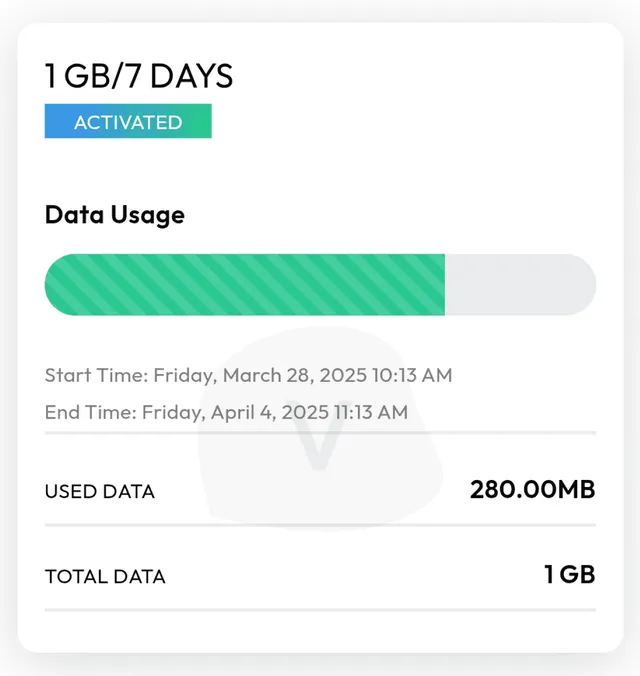
eSIM provider apps show what is left on the plan itself. In our tests, the Airalo app sent alerts at 25% and 10% of data left, and Nomad was the only app with a home-screen widget showing your remaining data. eSIM4Travel has no app, so you check your plan on its website.
How to cut your mobile data use
Wi-Fi is the biggest saver, and a few settings do the rest. Together these steps can cut data use by 30 to 50% without much effect on how you use your phone.
- Download on Wi-Fi first: maps, music, videos and podcasts before you leave the network.
- Lower streaming quality: video resolution and audio quality in each app's settings.
- Turn off autoplay and background refresh, so apps do not use data you did not ask for.
- Use a data-saving browser, for example Opera Mini.
- Let cloud sync and backups run on Wi-Fi only.
- Turn off automatic app updates over mobile data.
- Restrict background data for the apps that use the most.
For more ways to save data abroad, see our guide to saving data on vacation.
Fixed data plan or unlimited data?
Most people do not need unlimited data. A fixed plan costs less and runs at full speed until it ends. Unlimited makes sense for heavy video, hotspot use or long trips, but almost every unlimited plan slows down after a daily allowance. The table shows what we found for the providers we tested.
| Provider | Full-speed data per day | After that |
|---|---|---|
| Airalo | 3 GB | 1 Mbps until the daily reset |
| eSIM4Travel | 3 GB | up to 1 Mbps |
| Jetpac | 3 GB per 24 hours | up to 1 Mbps |
| GigSky | 3.5 GB | a slower speed it does not publish |
| Saily | 5 GB (3 GB on some plans) | 1 Mbps until midnight |
| Nomad | 2 GB | about 1 to 2 Mbps (its pages say 512 kbps) |
| Maya Mobile | about 5.5 GB in our test; its terms give no number | about 10 Mbps, reset daily |
| Holafly | no daily limit published | about 30 Mbps from the start in our test; hotspot capped at 1 GB a day |
| Yesim | not published | users report about 5 Mbps |
| Ubigi | about 15 to 25 GB per 7-day plan | 1 to 2 Mbps |
Roamless, GoMoWorld and Global YO sell no unlimited plans. At 1 Mbps you can still message and use maps, but video and large downloads crawl. If the calculator puts you under the daily allowance every day, a fixed plan is the cheaper choice. You can compare unlimited plans with fixed ones in our comparison tool, and our ranking of tested providers shows how each one did in our hands.
Using our data usage calculator to pick a plan
The calculator turns your habits into a data amount for your trip. It asks about four things:
- Trip length: how many days you need data.
- Usage level: your usual habits.
- Activities: the apps and services you will use.
- Wi-Fi access: how often you will have another connection.
You get an estimate based on your own use, so you neither pay for data you never touch nor run out halfway through the trip. Abroad you will likely use maps and translation apps more and have less Wi-Fi than at home, and the calculator takes that into account.
With the number in hand, compare plans of that size for your destination. Whether you look at Airalo, GigSky or another provider, knowing your real need is what keeps the plan from being too big or too small.
Frequently Asked Questions About Data Usage
How do I calculate how much data I need for a trip?
Is 2 GB of data enough for a week-long vacation?
Which activities use the most mobile data?
How accurate are data usage calculators?
How much data does social media use?
Do I need unlimited data or is a fixed plan enough?
How can I check my data usage in real time?

What is eSIM?
eSIM allows you to use a digital SIM card instead of a traditional plastic one. This enables you to purchase a SIM card online for the country you're traveling to.
The most well-known eSIM providers on the market are Airalo, Holafly, eSIM4Travel, Yesim, Saily and others.
Frequently asked questions about eSIM:
- Does my phone have eSIM?
- How to add eSIM to iPhone or Samsung?
- How to install eSIM on an older phone?
- What are the most affordable and best phones with eSIM support?

How to compare eSIM?
Here you can compare eSIM data packages for more than 200 countries, such as UK, USA, Egypt and others. And that for any duration and amount of data.
Along with additional information, such as provider ratings and whether the website is available in Czech.
Compare all eSIMs
Why can you trust Vefru?
Founders František and Jan experienced problems with mobile data every time they traveled outside the EU. As technology enthusiasts, the idea of traveling abroad without a data connection or risking truly insane roaming fees was unacceptable to them. Regardless of how adventurous the story of walking across Toronto on a winter night without an online map might be, it's not something they would want to repeat.
After the emergence of eSIM and later eSIM travel data package providers, they learned a lot about the technology and industry and decided to share their findings and the comparison tool they created for themselves with others. It now contains more than 20,000 updated eSIM mobile data packages from the most popular providers for more than 170 countries around the world.
Every time you read a guide on Vefru, it is created in the same way the author would research the topic themselves. From contacting locals about the best network operators, to recommending the most advantageous plans for what you really need, to technical guides on how to create a QR code for eSIM or how to troubleshoot eSIM issues. Most articles are created based on topics that the authors themselves have dealt with and for which they found the best solutions.

Technology experts
instead of copywriters

We test everything we
write about

We compare 20 thousand
eSIM data packages